Detail page
A detail page shows one record, says what state it is in, and offers the evidence behind it as tabs. A customer almost always arrives from a list.
When to use one
Use a detail page when a customer already knows which record they want, and the question is what to do about it.
Do not open a detail page for something that only needs a glance. A value that fits in a row belongs in the row, and a value that fits in a hover belongs in a hover.
Anatomy
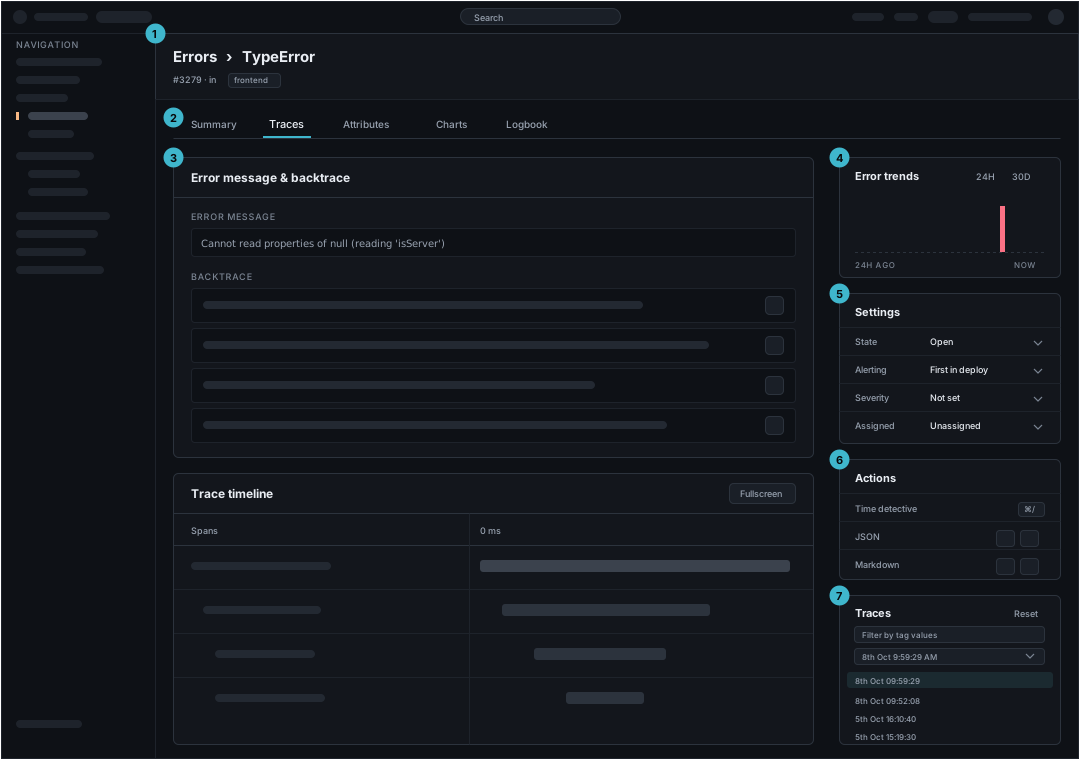
The header and the navigation are the same on every page and are described on /foundations/layout.md. The regions below are the page's own.
| Region | What it holds | Rule | |
|---|---|---|---|
| 1 | Breadcrumb and title | The way back, then the record's name, its identifier and its scope | Name the list. "Back" says nothing about the destination to someone who followed a link from elsewhere. The identifier under the name makes a pasted link recognizable without opening it |
| 2 | Tabs | The views of this one record | Each tab is its own URL. Reuse a name already used elsewhere for the same view rather than inventing a second word for it |
| 3 | Tab body | The evidence, in the wide column | This is the only region a tab changes. Everything outside it stays put, so two tabs are compared against the same state |
| 4 | Trend | One chart answering whether this is getting worse | A range toggle, not a filter. It says how the record is moving. The tabs say why |
| 5 | State | The record's own fields, changed here and nowhere else | Every row is a label and a current value. "Not set" is a value, and it reads differently from a blank |
| 6 | Actions | What can be done with the record, and what can be taken out of it | Two kinds in one card. Put the exports last. An export ends the visit, and the other actions continue it |
| 7 | Occurrence picker | Which instance of the record is on screen | A record with many occurrences needs somewhere to say which one is being read. It sits beside the body, so changing the occurrence changes the evidence and nothing else |
Regions 4 to 7 are a rail, and the rail does not move when a tab does. State, actions, and the occurrence picker belong there because all three are true of the record rather than of the view.
States
| State | What it says | What happens next |
|---|---|---|
| No such record | The link is wrong, or the record has aged out | Go back to the list. Say which of the two it is if the product can tell |
| The evidence has not arrived | The record exists and its body is still loading | Wait. Show the title and the state card first. Those decide the next step and do not wait on the body |
| One card failed | The rest of the page is fine | Retry inside the card that broke. Blanking the page because one of seven regions failed also hides the six that work |
| Nothing in the chosen window | The record exists and the picker's range holds no occurrence | Widen the range, which means the range has to be reachable from here |
The last state is the one most often missed. A record opened from a list inherits that list's scope, so a detail page can be empty because of a choice made two screens earlier.
What arrives from the list
The scope follows the customer in from the list, and the breadcrumb returns them to it unchanged. The full account of what travels and what does not is on /page-types/list.md.
Changing the scope here changes it for the list as well. There is one scope, set once. A record that keeps its own copy of the scope lets the two screens disagree about the same question.