Overview page
An overview page answers whether anything needs attention right now. It carries measures over one subject and, where the subject has them, the records that are currently open.
When to use one
Use an overview page when a customer arrives without a question and needs to be told whether to have one.
Do not use one to find a particular record. That is a list, and a list is where an overview sends people. Do not use one to explain a single record over time. That is the detail page's tab body.
Anatomy
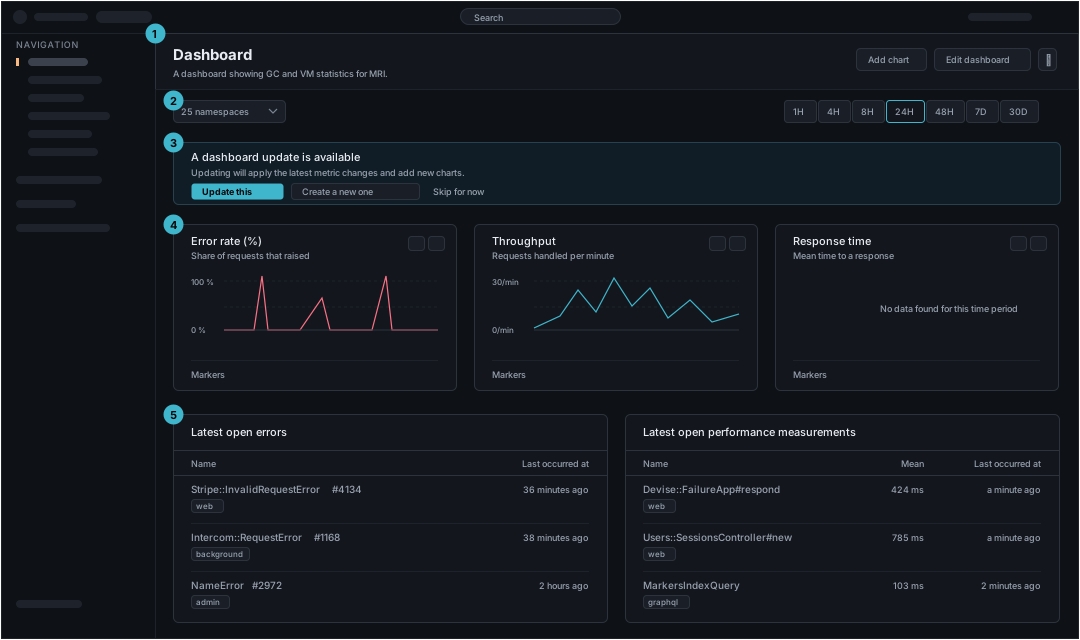
The header and the navigation are the same on every page and are described on /foundations/layout.md. The regions below are the page's own.
| Region | What it holds | Rule | |
|---|---|---|---|
| 1 | Page bar | The board, named, and what can be done to the whole board | A description belongs here when the board's name does not say what it covers. Actions here change the board itself, never what one card shows |
| 2 | Scope and range | What is in scope, and over how long | The range applies to every card at once, so a card that needs its own range says so on the card. Put both in the URL, because an overview is the page people paste when they are asking someone to look |
| 3 | Notice | One message about the board, and the choices it offers | Conditional. Every choice is a control, including the one that declines, so leaving is as easy as accepting |
| 4 | Measure grid | Equal cards, one measure each, with the controls that measure needs | A card titles its measure and says in one line what the measure is. The Markers lane runs along the foot of every card so events line up across the row |
| 5 | Attention lists | The records that are open, newest first | Conditional. The point of the row is the time, so it is the column on the right and it is relative. Each row opens the record, which is where an overview hands over to a detail page |
Regions 3 and 5 are conditional. A board of charts has neither. The rest is the same shape, which is why a dashboard and an application's overview are one page type and not two.
States
An overview is many cards, and they fail one at a time. A page-level state is only correct when the page itself has nothing.
| State | What it says | What happens next |
|---|---|---|
| One card has no data | The rest of the board is fine | Say it inside that card and leave the others alone. Hold the card's height so the row does not reflow |
| Nothing is connected yet | The subject has never reported | Say what to install or connect, in the card that would have shown it. This is the one state that is worth a control rather than a sentence |
| The range holds nothing | Data exists outside the chosen range | Say that the range is the reason, because an empty board and an unlucky range look identical |
| Loading | The queries are running | Hold every card's height. A board that grows as cards land moves what someone is already reading |
What travels out of an overview
An overview is a starting point, so what it hands on matters more than what it is given.
| Travels into the next page | Stays on the overview |
|---|---|
| The range, so a record opens showing the window that raised the question | The board, and which cards are on it |
| The scope, such as the namespace | The position in the attention lists |
A row in an attention list opens the record directly. A card opens the list behind the measure. Both keep the range, because a customer who narrowed to the last hour is asking about the last hour and not about the default.
The shapes on the other side are /page-types/list.md and /page-types/detail.md.