Form page
A form page collects the fields for one record and saves it. It opens over the page it was started from, and that page stays behind it.
When to use one
Use a form page when a customer is creating or changing one record and the fields do not fit in the row or the menu they started from.
Do not use one for a setting that applies the moment it is changed. That is a toggle on the page itself. Do not use one to show a record that already exists and is not being edited. That is a detail page.
Forms owns the field-level rules: which control to use, how to mark a field required, where help text goes, how to group and size the fields. This page is the surface those rules sit in.
Anatomy
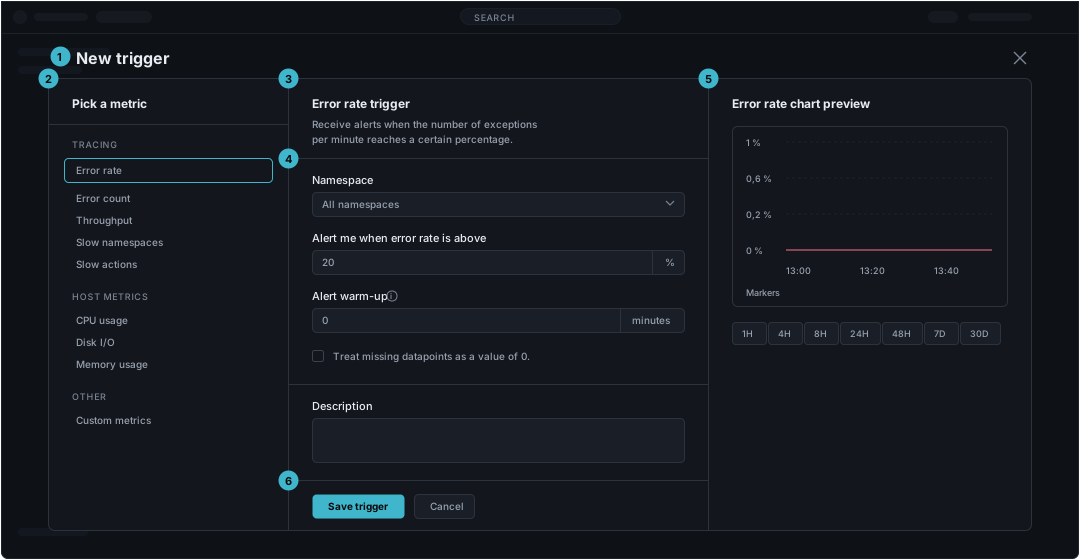
The page behind stays where it is and is not usable while the form is open. The regions below are the form's own.
| Region | What it holds | Rule | |
|---|---|---|---|
| 1 | Header | The record being made, and the way out | Name the record, not the act. The close control belongs here rather than in the body, because closing without saving must not scroll out of reach |
| 2 | Type rail | The variants that change which fields appear | Present only when a variant changes the fields themselves. Moving between entries swaps the form rather than editing a value in it, so the rail sits outside the fields it switches |
| 3 | Form header | The chosen variant, named, and one line saying what the saved record will do | One line. Anything longer is field help, and belongs beside the field it explains |
| 4 | Form body | The fields, in one column, grouped by divider | The page type fixes the column and nothing else. Control choice, required markers, help, grouping and widths are on /patterns/forms.md |
| 5 | Preview | The result, and the controls the result needs | Present only when the result is visual. It is the one thing the side panel may hold. With nothing to show it carries an empty state rather than an empty frame |
| 6 | Footer | The save, and the way out beside it | One primary, left-aligned, with Cancel next to it. It sits at the foot of the form column rather than the overlay, under the fields it submits |
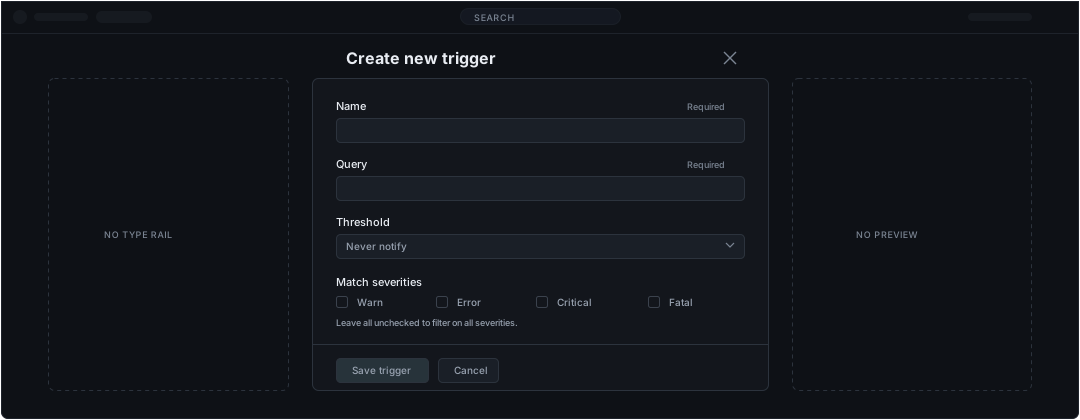
Regions 2 and 5 are conditional and often both absent. A form with no variants and no visual result is one column.
States
| State | What it says | What happens next |
|---|---|---|
| Nothing filled in | The form has just opened | Mark the required fields and leave the primary unusable. The marker is the explanation, so no sentence is needed to say the form is incomplete |
| A value is wrong | One field cannot be saved as entered | Leave every value in place and keep the form open. A form that clears the field removes the evidence of the mistake. Where the message itself goes is a field-level rule, and /patterns/forms.md is where it belongs |
| Saving | The record is being written | Keep every field visible and the primary unusable. The form has nowhere to put what was typed if it blanks and the save then fails |
| The save failed | The record was not written | Say what failed and leave every value in place. Retyping a long form is the cost of clearing it |
| The preview has nothing to show | The fields so far do not describe a result | Say which field would produce one, following the empty state pattern. An empty frame reads as a broken preview |
What the form arrives with
A form is opened from somewhere, and that place is context the form already has. A form opened from one dashboard, one application or one namespace does not ask which one.
| Comes in from the page behind | Is asked for in the form |
|---|---|
| The record the form will belong to, such as the dashboard or the application | Everything about the new record itself |
| The scope already set, such as the namespace | A scope the new record needs and the page behind cannot supply |
Closing returns to the page the form opened over, unchanged. Saving returns to the same place with the new record in it. Neither lands on a list, because the form was not opened from one.