List page
A list page shows every record of one kind and gives a row to open each one. It is the most common way into the product.
When to use one
Use a list page when a customer arrives without knowing which record they want, and the way to find it is to narrow the set.
Do not use one to show how a single record changed over time. That belongs in the detail page's tab body. Do not use one as an overview. A list answers which record to open, and an overview answers whether anything needs attention.
Anatomy
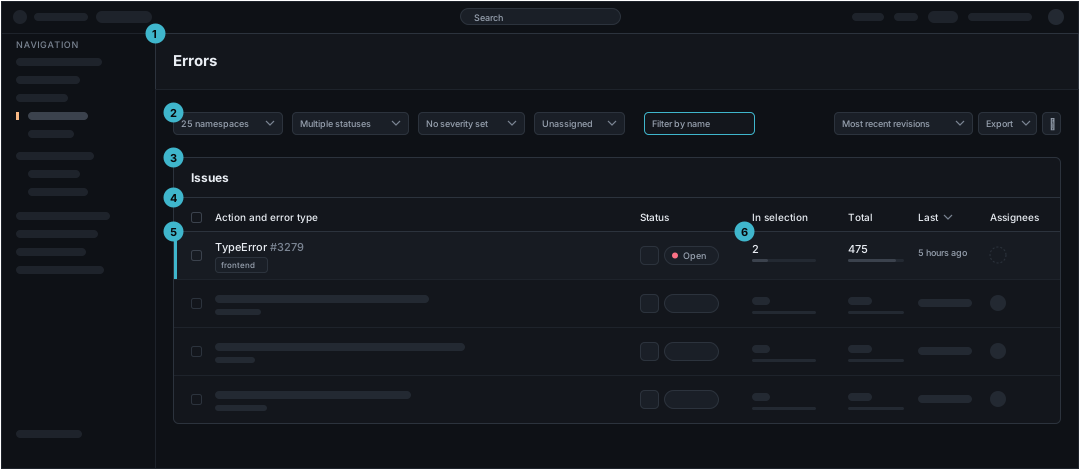
The header and the navigation are the same on every page and are described on /foundations/layout.md. The regions below are the page's own, in this order.
| Region | What it holds | Rule | |
|---|---|---|---|
| 1 | Page bar | The set, named | One name, nothing else. An action belongs here only if it applies to the whole set rather than to a row |
| 2 | Filter bar | Three jobs in one row, left to right: what is in scope, which record to find, how the rows are ordered | Put every filter in the URL. A filtered view can then be pasted into a chat and opened by someone else |
| 3 | Card | The table, in a card that names what the rows are | The page bar names the section and the card names the collection. A page that keeps those separate can grow a second collection without being renamed |
| 4 | Column header | The columns, and which one is sorting | The first column identifies the record and is the widest. Sorting marks itself in the header, not only in the order of the data |
| 5 | Row | One record: what it is, the scope it came from, its state, and who owns it | The whole row opens the record. Change state from the row, so triaging a set does not mean opening every record in it |
| 6 | Measure columns | A number with a bar beneath it | The bar makes rows comparable at a glance and the number makes the bar checkable. Use both |
The filter bar design is changing
The filter bar drawn and described on this page is the one that ships today, and it is being redesigned. The rules hold: scope, search and ordering in one row, and every filter in the URL. The controls themselves, their order and their labels are the part that will move.
States
A list has four states and they are not interchangeable. The wrong one sends a customer to fix the wrong thing.
| State | What it says | What happens next |
|---|---|---|
| Nothing has ever arrived | This application has reported no records of this kind | Install, configure, or wait. Do not offer the filter as the cause |
| The filter excluded everything | Records exist, and none match | Widen the filter. Keep it on screen, and name it in the wording |
| Loading | The query is running | Wait. Hold the height the rows will occupy, so the page does not jump when they land |
| The query failed | Something broke | Retry. Say what failed, and keep the filter bar usable so a narrower query can be tried |
The first two states are easy to confuse. They look the same on screen and lead to opposite actions, so write them as two different screens and never share wording.
What travels into the record
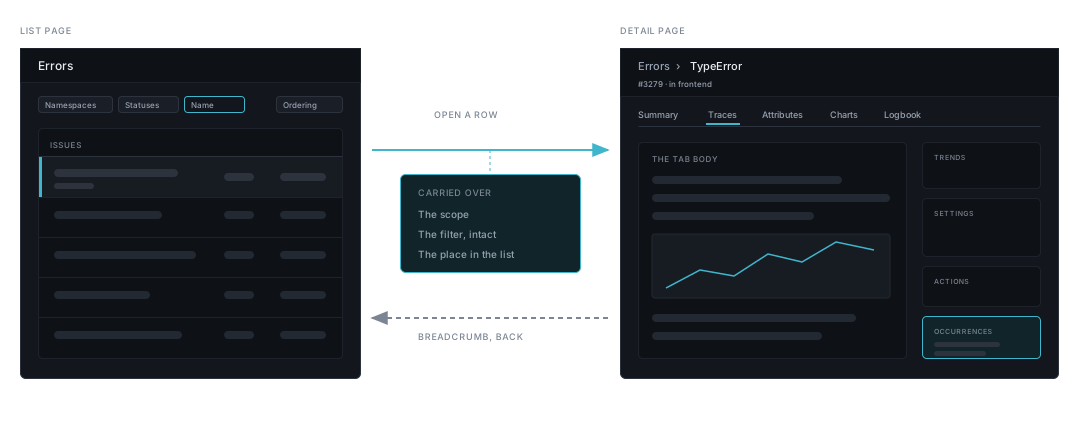
The scope set on the list follows the customer into the record. Narrowing to one namespace is a deliberate choice, and a record that drops the scope shows different numbers than the list did.
| Travels into the record | Stays on the list |
|---|---|
| The scope the whole set was narrowed to, such as the namespace or the time range | The ordering |
| Enough of the filter to rebuild the list on the way back | The name filter |
| Which row was opened, so the list returns to it | The row selection |
The right-hand column still has to survive the round trip. The breadcrumb on the record is the way back, and it returns to the list as it was: same filter, same order, same place in the rows. The record's own anatomy is on /page-types/detail.md.